
Learning tools / September 2026
Differential Equation Lab
See what an equation does.
THE IDEA
See what an equation does.
Equations become easier to ask questions about when their motion is visible. I built the lab so a student can make a prediction, change one thing and compare the result.
What I built
A safe expression parser and numerical lab for first-order equations, second-order motion and systems with up to three state variables. Presets include growth, pendulums, oscillators and the Lorenz system.
Working with AI
AI can help produce a solver quickly, but the result needs mathematical checks. Separating the parser, integration engine and view makes it possible to compare computed trajectories with known behavior and handle invalid equations clearly.
A QUICK DEMO
Give a pendulum some friction
Try the project with a small, deliberate experiment.
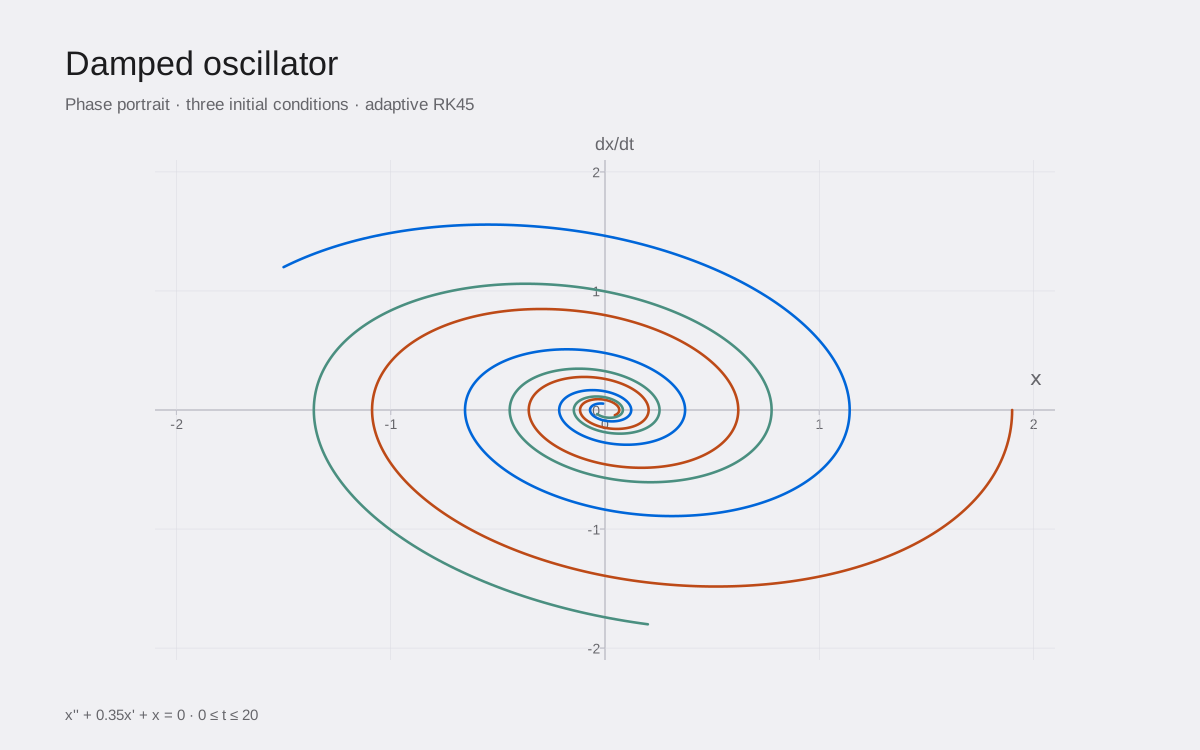
Numerical demo · damped oscillator · computed from the lab engine
Open the lab and choose the Damped pendulum preset.
Move μ toward zero. Predict whether the motion should keep swinging before you run it.
Increase μ and compare the trajectory. Change the starting angle to see how initial conditions matter.
PROJECT SCOPE
What to know.
- This lab handles ordinary differential equations, with at most three state variables. Use the Visual Math Lab for heat diffusion.
- Plots are numerical approximations with finite step sizes and plotting ranges.
- Browser storage is local to your device; there is no shared student account.
209 mathematical and 77 isolated view checks pass. Fresh Edge browser checks also exercise all 19 presets, custom equations, invalid-input recovery, playback, stepping and a 390-pixel layout. See verification notes →